Barry's Coilguns
Coilgun Mark 2
- Introduction
- Hints and Suggestions
- RLC Simulation
- RLC Analysis
- LC Time Sim
- Inductor Sim
- Wire Loop
- Java
- Photographs
- Schematic
- SCR
- Construction
- Result: Position
- Result: Turns
- Result: Length
- Result: Iron
- Result: Tube
- Result: Voltage
LC Time Simulation
What if you have your capacitor, and know the desired discharge time? This page helps design your coil by telling you the inductance needed for the discharge time. Note the timing does not include effects of a projectile.
Assumptions
This applet applies to low-resistance circuits. That is, it assumes the discharge is essentially sinusoidal, as is the case with under-damped RLC circuits. A small amount of resistance will not significantly change the timing, as long as R2C2 < 4LC.
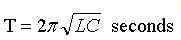
It solves for time by using the basic equation for time T in an LC resonant circuit:
If your circuit is critically damped or over-damped, don't rely on this applet. The timing will be a little slower than shown here.
LC Time Simulation
This program calculates time by solving the formual (above) for inductance. For example, the zero-crossing formula for inductance in an undamped LC circuit works out to be:
        T2
L = -------------
      pi2 * C
where T = time in seconds, pi is 3.14159, and C is capacitance in farads.
The inductance L is in henries. The formula is simple; however the Java applet
source code got messy by showing values in engineering units.
Your goal in this simulator is to choose the inductance. Use this value to design your coil. (Hint: See the next page!)
Send Me To Starbucks!
Do you like this? Say 'thanks' by funding a trip to Starbucks for my favorite mocha. Click the PayPal donate button above to send $5 and I'll be very grateful. I can convert coffee into software and wine into headaches.
What do you use this LC time simulator for? Write me - I'd like to hear!
Comments and feature requests are invited! Send them to Barry.
| < Previous | Page 5 of 18 | Next > |
©1998-2026 Barry Hansen